
Download Java source from src.zip.
StackPane is a container which can contain different interface components, subcomponents stacked up to others, and at a certain moment, you can only see the subcomponent lying on the top of Stack.
These subcomponents which are newly added will lie on the top of Stack

You can put a certain subcomponent in front of Stack via method named toFront(),
or put the subcomponent in the bottom of Stack via method named toBack().
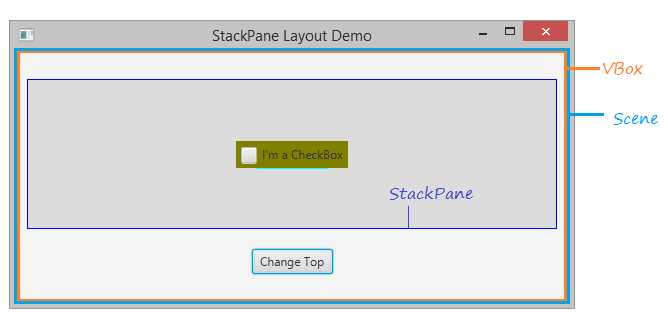
Normally, you only display the subcomponent on the top of StackPane and hide other
subcomponents, using the Node.setVisible(visible) method.
Let's see the illustrative example: StackPaneDemo2.java
StackPaneDemo.java
import javafx.application.Application;
import javafx.collections.ObservableList;
import javafx.event.ActionEvent;
import javafx.event.EventHandler;
import javafx.geometry.Insets;
import javafx.geometry.Pos;
import javafx.scene.Node;
import javafx.scene.Scene;
import javafx.scene.control.Button;
import javafx.scene.control.CheckBox;
import javafx.scene.control.Label;
import javafx.scene.layout.StackPane;
import javafx.scene.layout.VBox;
import javafx.stage.Stage;

public class StackPaneDemo extends Application {

    private StackPane stackPane;

    @Override
    public void start(Stage primaryStage) throws Exception {

        VBox root = new VBox();

        // StackPane
        stackPane = new StackPane();

        // Add Label to StackPane
        Label label = new Label("I'm a Label");
        label.setStyle("-fx-background-color:yellow");
        label.setPadding(new Insets(5,5,5,5));
        stackPane.getChildren().add(label);

        // Add Button to StackPane
        Button button = new Button("I'm a Button");
        button.setStyle("-fx-background-color: cyan");
        button.setPadding(new Insets(5,5,5,5));
        stackPane.getChildren().add(button);

        // Add CheckBox to StackPane
        CheckBox checkBox = new CheckBox("I'm a CheckBox");
        checkBox.setOpacity(1);
        checkBox.setStyle("-fx-background-color:olive");
        checkBox.setPadding(new Insets(5,5,5,5));

        stackPane.getChildren().add(checkBox);


        //
        stackPane.setPrefSize(300, 150);
        stackPane.setStyle("-fx-background-color: Gainsboro;-fx-border-color: blue;");

        //
        root.getChildren().add(stackPane);

        Button controlButton = new Button("Change Top");

        root.getChildren().add(controlButton);
        root.setAlignment(Pos.CENTER);
        VBox.setMargin(stackPane, new Insets(10, 10, 10, 10));
        VBox.setMargin(controlButton, new Insets(10, 10, 10, 10));
        //

        Scene scene = new Scene(root, 550, 250);

        primaryStage.setTitle("StackPane Layout Demo");
        primaryStage.setScene(scene);

        controlButton.setOnAction(new EventHandler<ActionEvent>() {

            @Override
            public void handle(ActionEvent event) {
                changeTop();
            }

        });

        primaryStage.show();
    }

    private void changeTop() {
        ObservableList<Node> childs = this.stackPane.getChildren();

        if (childs.size() > 1) {
            //
            Node topNode = childs.get(childs.size()-1);
            topNode.toBack();
        }
    }

    public static void main(String[] args) {
        launch(args);
    }

}
Maintained by John Loomis, updated Mon Mar 12 11:23:20 2018