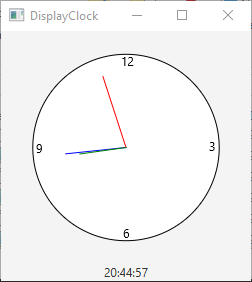
See also ClockPane.java
DisplayClock.javaimport javafx.application.Application;
import javafx.geometry.Pos;
import javafx.stage.Stage;
import javafx.scene.Scene;
import javafx.scene.control.Label;
import javafx.scene.layout.BorderPane;
public class DisplayClock extends Application {
@Override // Override the start method in the Application class
public void start(Stage primaryStage) {
// Create a clock and a label
ClockPane clock = new ClockPane();
String timeString = clock.getHour() + ":" + clock.getMinute()
+ ":" + clock.getSecond();
Label lblCurrentTime = new Label(timeString);
// Place clock and label in border pane
BorderPane pane = new BorderPane();
pane.setCenter(clock);
pane.setBottom(lblCurrentTime);
BorderPane.setAlignment(lblCurrentTime, Pos.TOP_CENTER);
// Create a scene and place it in the stage
Scene scene = new Scene(pane, 250, 250);
primaryStage.setTitle("DisplayClock"); // Set the stage title
primaryStage.setScene(scene); // Place the scene in the stage
primaryStage.show(); // Display the stage
}
/**
* The main method is only needed for the IDE with limited
* JavaFX support. Not needed for running from the command line.
*/
public static void main(String[] args) {
launch(args);
}
}
Maintained by John Loomis, updated Sun Feb 11 12:16:30 2018