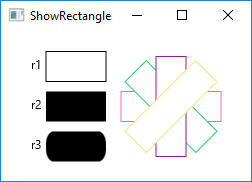
ShowRectangle.javaimport javafx.application.Application;
import javafx.scene.Group;
import javafx.scene.Scene;
import javafx.scene.layout.BorderPane;
import javafx.scene.paint.Color;
import javafx.stage.Stage;
import javafx.scene.text.Text;
import javafx.scene.shape.Rectangle;
public class ShowRectangle extends Application {
@Override // Override the start method in the Application class
public void start(Stage primaryStage) {
// Create rectangles
Rectangle r1 = new Rectangle(25, 10, 60, 30);
r1.setStroke(Color.BLACK);
r1.setFill(Color.WHITE);
Rectangle r2 = new Rectangle(25, 50, 60, 30);
Rectangle r3 = new Rectangle(25, 90, 60, 30);
r3.setArcWidth(15);
r3.setArcHeight(25);
// Create a group and add nodes to the group
Group group = new Group();
group.getChildren().addAll(new Text(10, 27, "r1"), r1,
new Text(10, 67, "r2"), r2, new Text(10, 107, "r3"), r3);
for (int i = 0; i < 4; i++) {
Rectangle r = new Rectangle(100, 50, 100, 30);
r.setRotate(i * 360 / 8);
r.setStroke(Color.color(Math.random(), Math.random(),
Math.random()));
r.setFill(Color.WHITE);
group.getChildren().add(r);
}
// Create a scene and place it in the stage
Scene scene = new Scene(new BorderPane(group), 250, 150);
primaryStage.setTitle("ShowRectangle"); // Set the stage title
primaryStage.setScene(scene); // Place the scene in the stage
primaryStage.show(); // Display the stage
}
/**
* The main method is only needed for the IDE with limited
* JavaFX support. Not needed for running from the command line.
*/
public static void main(String[] args) {
launch(args);
}
}
Maintained by John Loomis, updated Sun Feb 11 11:56:24 2018